Showing posts with label Discovery Education. Show all posts

Friday, September 30, 2022

Discovery Education


Discovery Education


Innovative, interesting, and ready to use lessons for Science, Language Arts, Social Studies, STEM Coding, Current Events, Virtual Field Trips and more. It's it already in your CLEVER for your you!  Explore and take your lesson to a whole new level.

Friday, December 17, 2021

Discovery Education Interactives

 Discovery Education Interactives


Are you a Math, Science, or Social Studies Teacher? If so, Discovery Education has some awesome Interactive resources for you!


Check below to see if the DE Interactives work for your grade level. Then click here and subscribe to the DE Best of Interactives channel.


Subject

Grade Levels

Spanish?

Math

6-12

No

Science

K-12

Yes (for K-8)

Social Studies

3-8

No

Thursday, October 21, 2021

Discover the Discovery Education Activity Center!

 Discover the Discovery Education 

Activity Center!


Discovery Education has an awesome new channel called the Activity Center. Each month DE will curate a monthly activity center full of learning activities for grade bands spanning K-8. Check out pictures of the K-2, 3-5, and 6-8 October Activity Centers.


Better yet, click HERE to see them for yourself and to SUBSCRIBE to the DE Activity Channel!


DE even made a video showing how you can customize the monthly Activity Center to meet your scholars' specific learning needs. Click HERE to learn how.


Wednesday, October 13, 2021

Asynchronous Activity Ideas

 Asynchronous Activity Ideas


Need asynchronous activity ideas for homework or an Asynchronous school day? If so, read on.

Examples of asynchronous learning activities:

  • Watching pre-recorded lecture videos or lessons
  • Viewing video demonstrations
  • Reading and writing assignments
  • Student presentations 
  • Learning activities such as quizzes, problem-solving, and/or games

Some great asynchronous activity options in our district are:
If you would like help getting started on any of these platforms, or help creating asynchronous activities, email Tiffaney Trella, Rachel Carter, or Andrea Lewinsky from YCSD Tech Integration and we will be happy to help!

Do you have any other great asynchronous activity ideas? Please share them in the comments below. 


Thursday, September 23, 2021

The NEW Quiz Feature in Discovery Education

The NEW Quiz Feature in Discovery Education


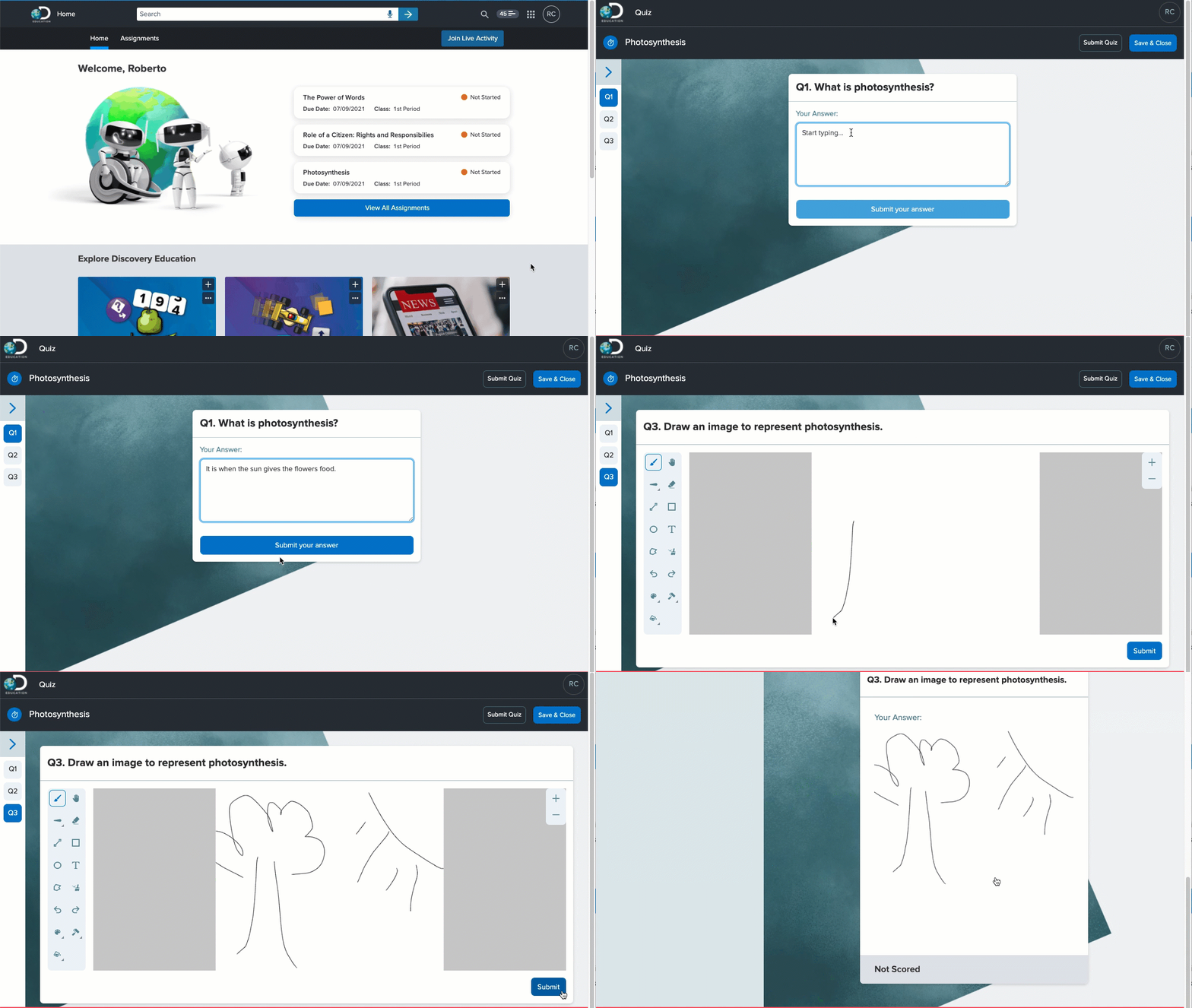
Discovery Education has made many updates and improvements since last year. They have also built out many ready-to-use activities that you can easily edit to meet your scholars' needs. Arguably the best update is the new Quiz feature in Discovery Education! It is like an awesome mix of Edpuzzle, ClassFlow, & Pear Deck rolled into one easy-to-use tool.

Video Quiz

Create a Video Quiz to ask comprehension questions at points you choose within a video clip. Assess scholars using the following response types:
  • Short Answer
  • Poll
  • Multiple Choice

Standard Quiz


Create a Standard Quiz to assess scholars using these response types:
  • Short Answer
  • Poll
  • Multiple Choice
  • Multiple Select
  • Drawn response
  • Annotate (uploaded image)
  • Audio response

Live Quiz


Launch a Live Quiz to verbally ask scholars a question that they type a response to in real-time. At any point during a Live Quiz, you have the option to launch an Exit Ticket to gauge how scholars are feeling about the quiz. 

Assign a Quiz or Launch a Quiz

A scholar can launch an assigned quiz (video or standard quiz) from their DE homepage and complete it at their own pace. 


When you launch a quiz live, you
 have two options: Teacher-Led, where you control the pace, or Student-Led, where scholars progress at their own pace. You can invite scholars with a link or with a join code. During a live quiz, you can view results as they come in live and grade them then, or wait until the end. 

View Quiz Results

For all quiz types, you can mark the results correct or incorrect as they come in during the quiz. For live quizzes, this gives the scholar the opportunity to see their results at the end of the quiz. Or, you can wait until the quiz is ended and then view and score the results in the Results Dashboard. If you do not review results at the end of the quiz, you can view them at any time by clicking the Quiz tile on their My DE homepage and then selecting Results from the left sidebar. Quiz Results can be exported to a .CSV file or Excel File with a breakdown of how each scholar did on each question. 

At the top of the quiz results dashboard, you can see a class summary showing the high and average scores, percentage of engaged scholars, number of responses, number of questions, and how long the quiz took. Then, you can look at the results. There are three views: 

  • Report View- which allows you to see a quick glimpse of how students performed on questions throughout the quiz. You can look for trends that will help you make instructional decisions from this summary. 

  • Question View- which shows each question and the number of responses. You can expand each question to see all scholar responses and mark responses as correct or incorrect. 

  • Student View- which shows each scholar and the number of responses and correct answers they have. You can expand each scholar to see all of their responses to all questions. You can also score scholar answers here.